Making Social Housing Inclusive
Role
Lead Designer
UX Researcher
Accessibility Expert
Company
Wolverhampton Homes
Industry
Social Housing
Platform
Website
↑ 50%
Easier navigation journeys
Average user journeys are now streamlined from 4–5 levels to just 2–3 levels, helping tenants reach services faster.
100%
WCAG 2.1 AA compliance
Every component meets accessibility standards, with improved contrast, focus states, touch targets, and semantic structure to support all users, including screen reader users.
3
Streamlined journeys
Repairs, rent, and contact are now easier to find, addressing the 53% tenant priority around repairs.
100%
Satisfied client and tenants
The redesigned experience was met with overwhelmingly positive feedback, validating the user-centred approach and outcomes.
About this project
Wolverhampton Homes manages homes for over 24,000 tenants under one broken website. For a lot of these tenants (elderly residents, people with disabilities or people with limited digital confidence), this wasn't just inconvenient but a real life barrier to managing their home, paying rent or getting a repair sorted.
WH came to Prodo wanting to redesign a website that over the years became increasingly difficult to use. Despite 63% of tenants visiting regularly, satisfaction sat at just 3.6 out of 5 and nearly a third had given up on the digital platform entirely and were calling the support team for things that should have been easily found online.
As the Lead Designer and Accessibility Expert at Prodo, I led this project from start to finish over 8 months. This is how I turned a frustrating website into something built around tenants.
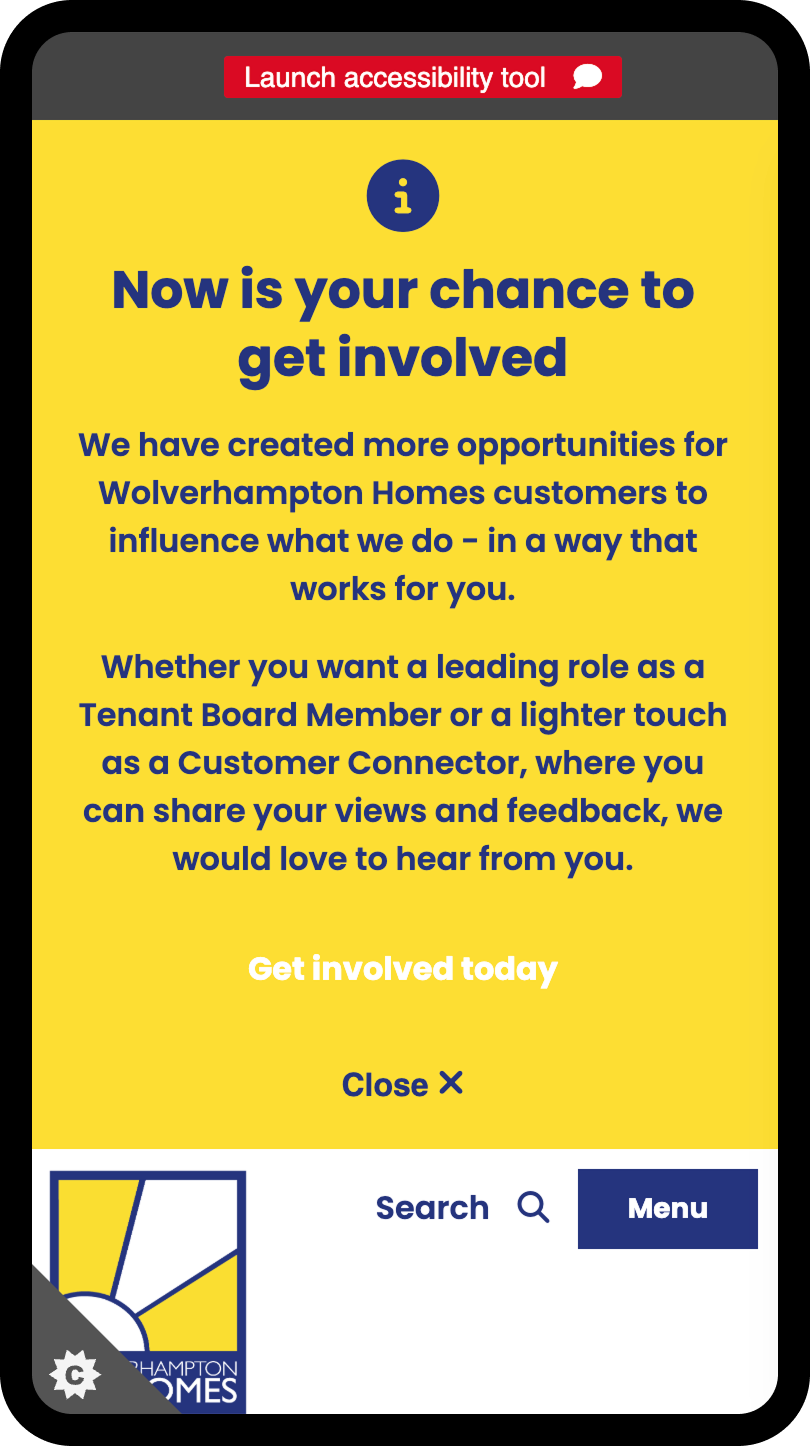
What users see when they land on the mobile version of the website: there are many issues such as the scale of the alert banner, insufficient colour contrast, missing ARIA labels (and much more)
Team Structure
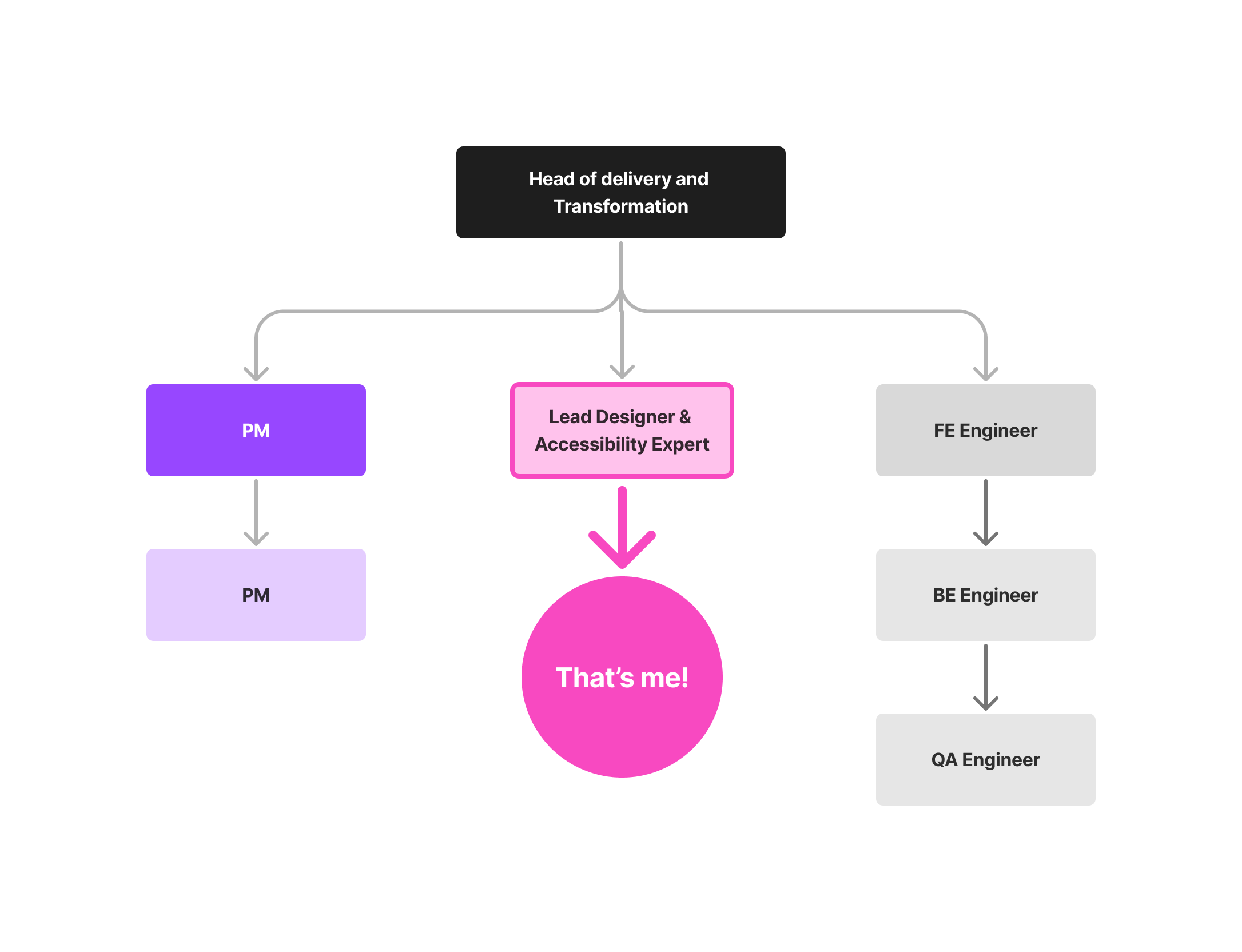
The team consisted on me, the Lead Designer & Accessibility Expert, one of our Product Managers, the Engineering Team which had one front end and one back end developer & QA.
As the only designer on this project, I owned the entire design process from research through to delivery. This end-to-end ownership allowed me to maintain design consistency and accessibility standards throughout the entire process, whilst working collaboratively with the PM and engineering team.
The Challenge
For a social housing provider, a broken website isn't just a UX problem, but a barrier between vulnerable people and the services that keep them safe and housed. That was something I had in mind during the whole project and made every decision really count.
85%
mobile users stuck
The majority of mobile users got trapped by the website’s desktop-first design.
Circular
navigation loops
Poor UX was preventing important common task completion like paying their rent.
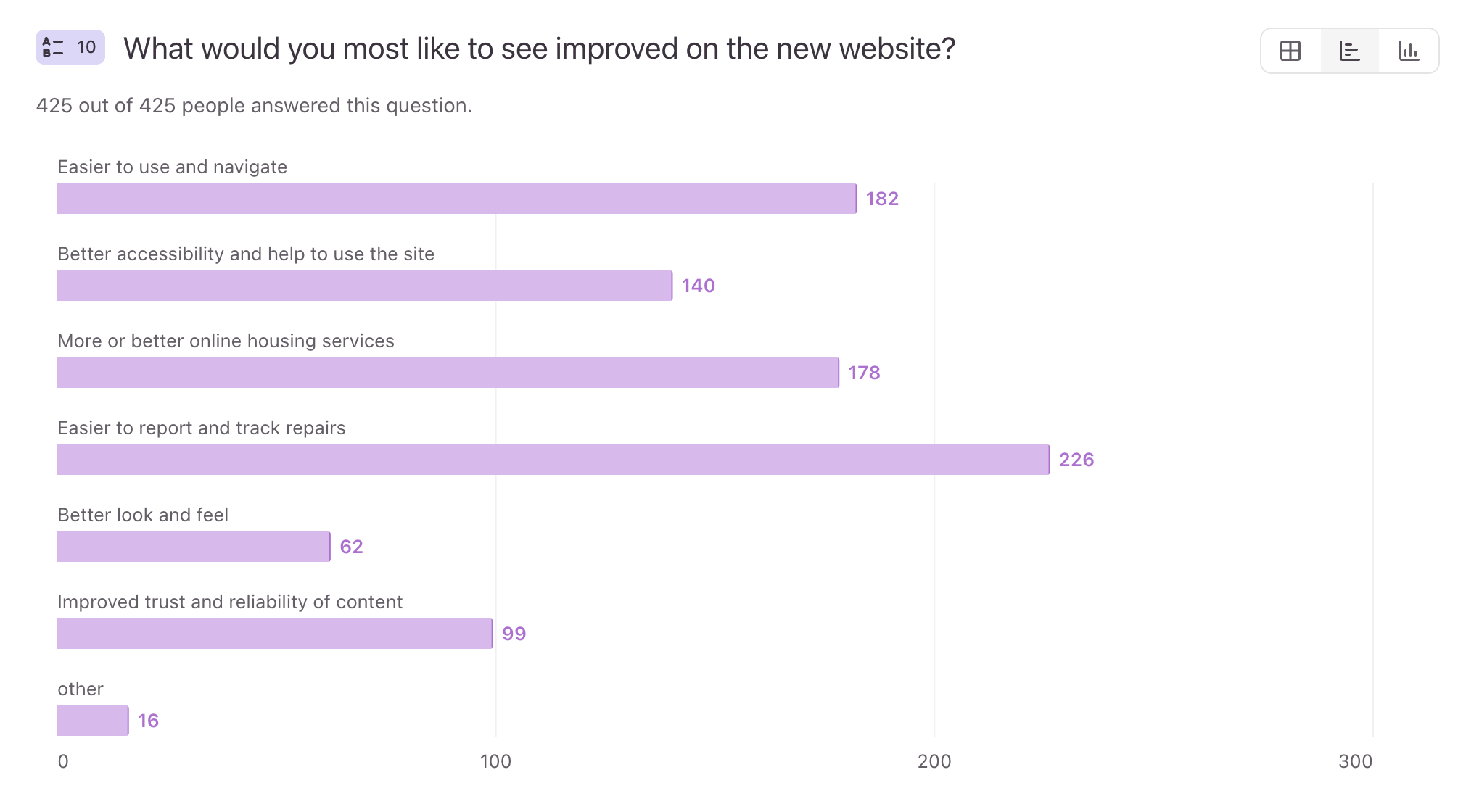
53.3% needed easier repair reporting
Tenants needed a more efficient way to raise repairs - at the moment they were struggling to find the information and were forced to call the support team.
Critical
accessibility failures
Lack of accessible considerations was excluding tenants with disabilities.
Outdated UI
Beyond these functional issues, Wolverhampton Homes also wanted to refresh the website's visual identity to make it more engaging and modern as they felt their current website was cold, corporate and uninviting:
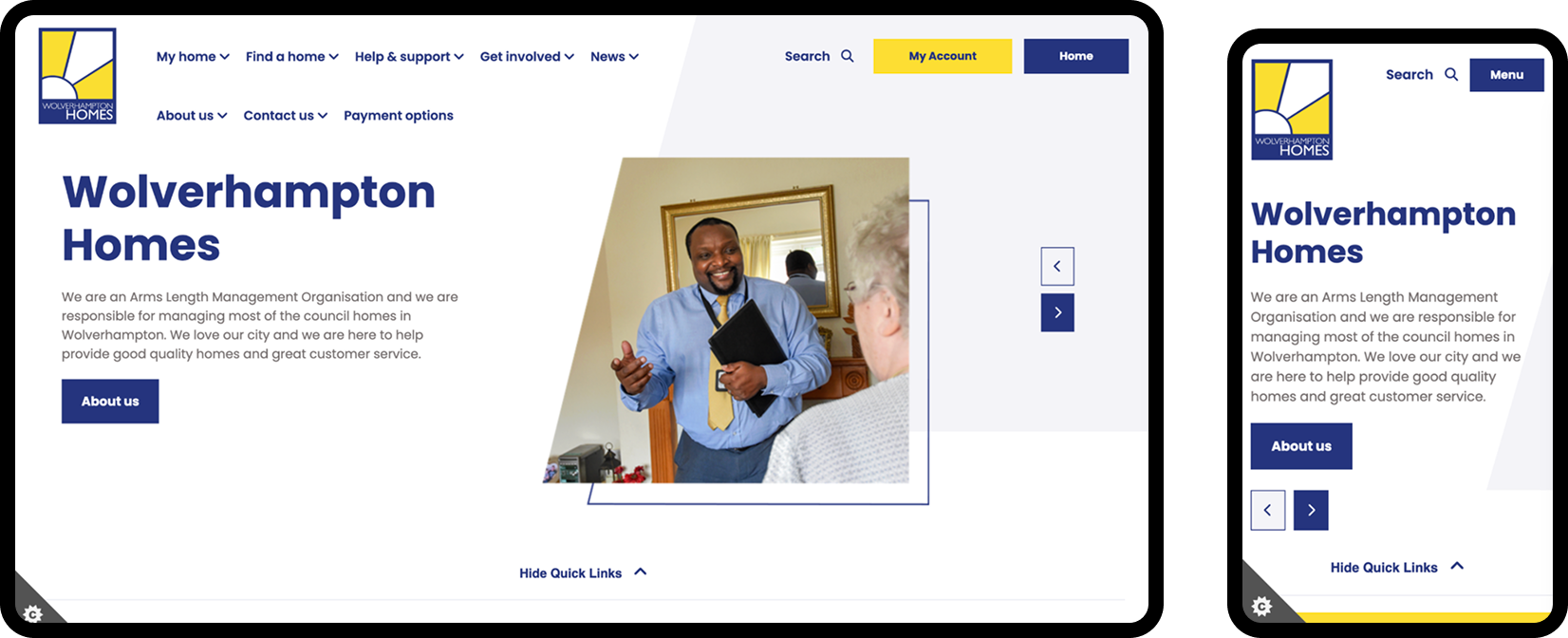
Wolverhampton Home’s website - desktop and mobile versions
Why does this matter?
For a social housing provider, every excluded tenant represents a failure to serve vulnerable communities who depend on these essential services.
I was tasked with solving this crisis that had a real life impact for both tenants and Wolverhampton Homes.
Discovery
I had a few weeks to gather research, no team behind me, and a very diverse base of different ages, ability, and digital confidence so using one method alone wouldn’t be sufficient.
I decided to combine a variety of different methods: a Typeform survey that reached 425 respondents (mostly tenants), covering satisfaction, device usage, priority tasks, and accessibility barriers, a full year of Google Analytics covering 167,000 page views and 50,000 sessions, a WCAG 2.1 AA accessibility audit using IBM Equal Access, WAVE, and Lighthouse, stakeholder workshops with staff and tenants, and a competitor review of other housing association websites to understand what good actually looked like in this sector.
Was it a lot to manage alone? Absolutely, yes! BUT it was necessary to find the right solution.
Typeform Survey
I started by creating a Typeform survey to gather feedback from the residents and Wolverhampton Homes staff. For residents, I focused on their experience using the website and on accessibility barriers and for the staff I focused on operational struggles and how they used the website as a business.
Tenant input
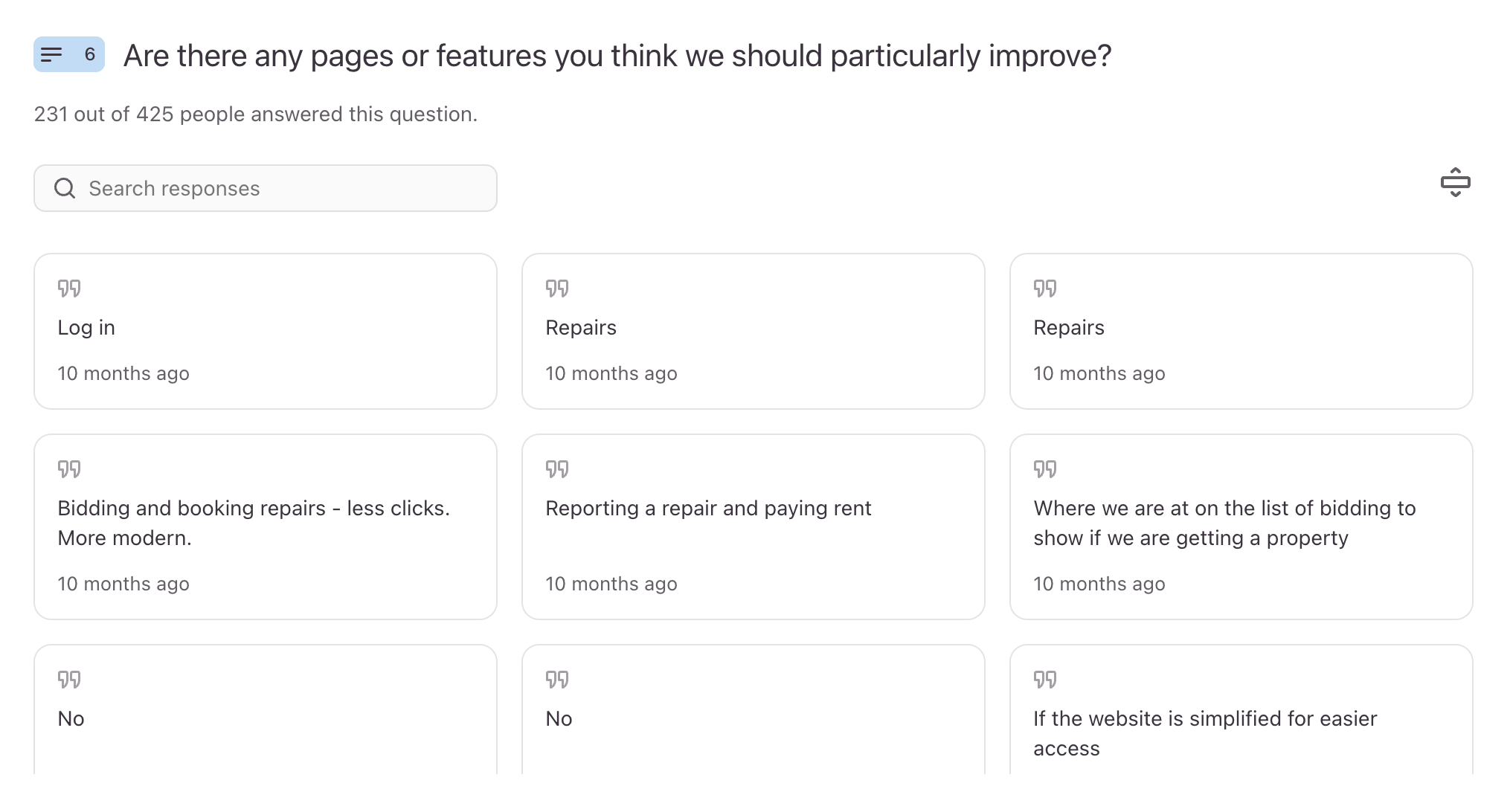
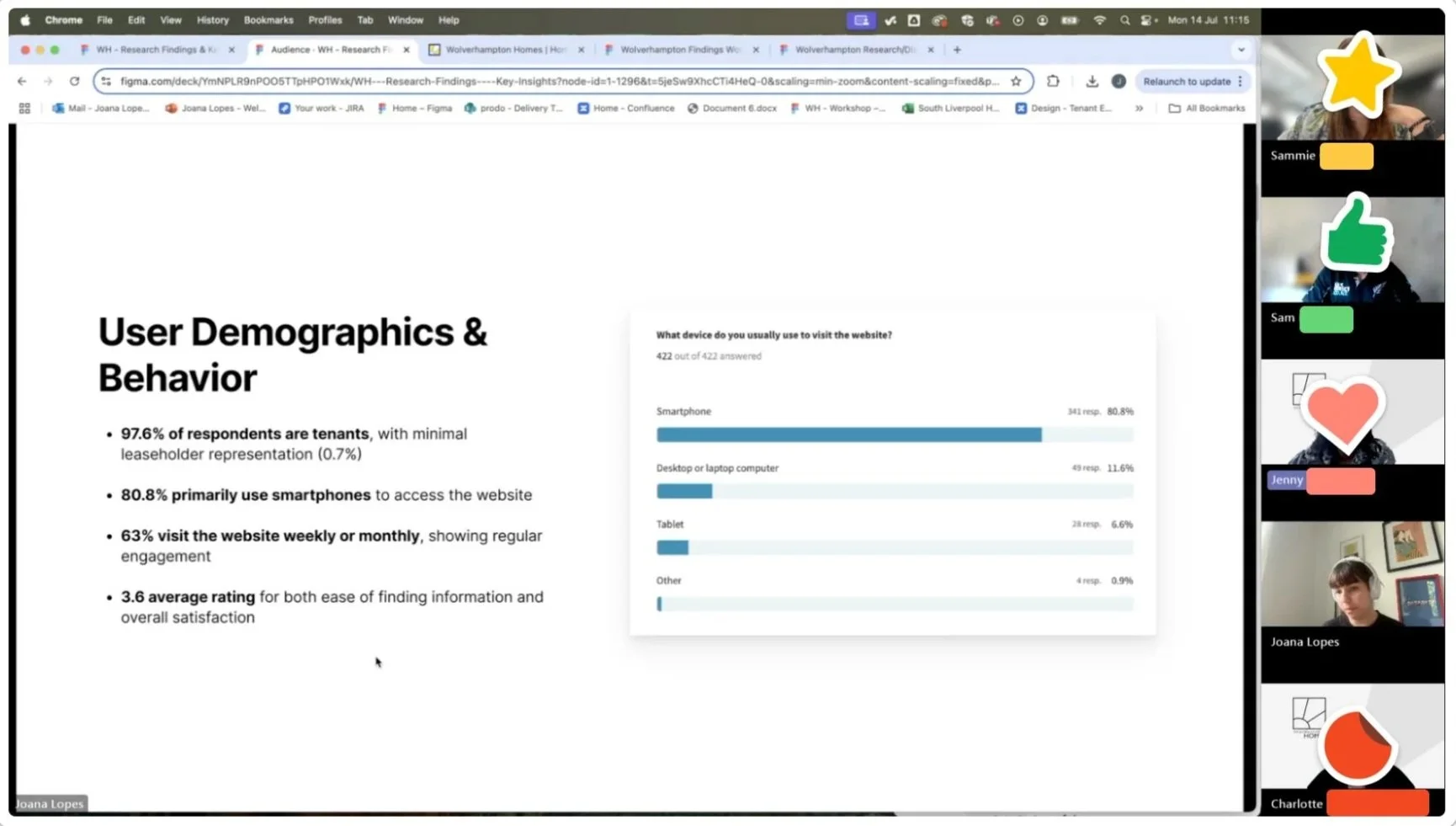
The survey reached 425 respondents (97.4% tenants) and revealed critical insights about satisfaction levels (3.6/5), device usage (80.6% mobile), and priority needs (53.3% wanted easier repairs). The open-ended responses provided a good understanding on their frustrations, barriers, and communication preferences that helped me shape my design decisions.
Stakeholders input
The staff feedback validated that the website was inefficient and was creating unnecessary workload, with many tenants reaching out via phone to ask for help with tasks that should be simple self-service journeys.
Google Analytics
I analysed a full year of behaviour data (July 2024 - July 2025) covering 24,000 users across 167,000 page views and 50,000 sessions. This analysis revealed consistent patterns in how tenants were actually using the site versus how we expected them to.
Some of the key behavioural insights were:
Mobile-desktop divide
The data showed 85.5% mobile traffic but significantly lower engagement times on mobile devices
Homepage engagement
32,249 views but only 17-second average engagement, indicated possible confusion
Repairs bottleneck
29,607 repair page views but low completion rates, were forcing tenants to call instead
High Contact Us Traffic
13,318 Contact Us page visits indicated users couldn't find information through normal navigation
Search failures
30% of searches returned zero relevant results, leading to task abandonment
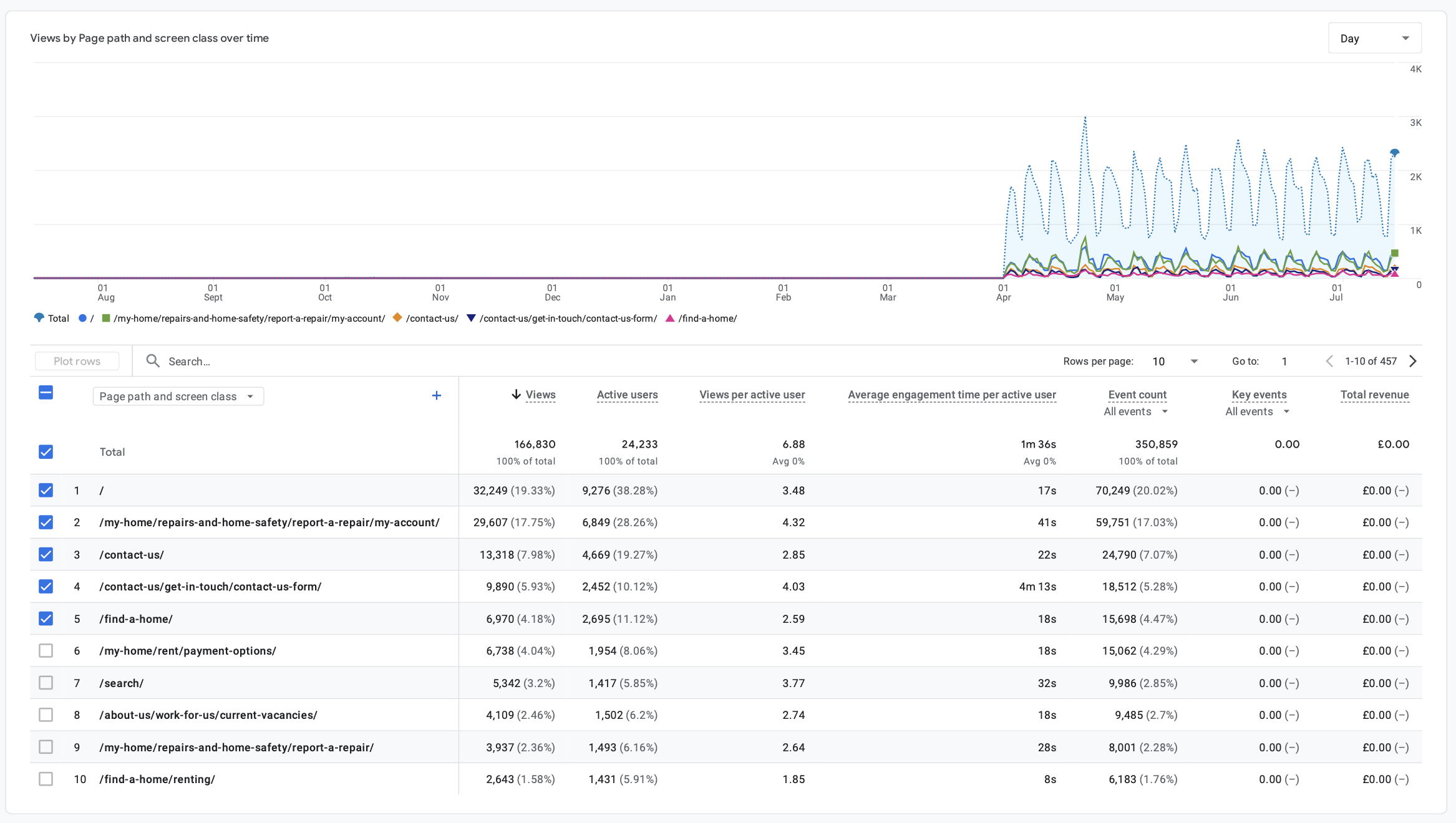
Top visited pages
Accessibility Audit
Part of my research was conducting a WCAG 2.1 AA audit using both manual testing and automated tools (IBM, WAVE and Lighthouse) to understand where the current site was failing users with disabilities.
During my testing I checked things like screen reader navigation, keyboard-only navigation, colour contrast analysis and cognitive load assessment. I was particularly looking for the violations that are most common in the social housing sector: insufficient contrast ratios, missing or poor focus indicators, broken heading hierarchies, and touch targets below the 44px minimum.
The audit revealed critical barriers that were preventing vulnerable tenants from accessing essential services, giving me a clearer and complete picture of what I needed to address in the redesign.
Stakeholder Workshops
I had the chance to speak directly to both Wolverhampton Homes' staff and a few tenants which was crucial for understand things that couldn't be captured in the survey. This allowed me to ask follow-up questions, dive deeper into specific pain points, see firsthand how different people interacted with the current site and show them some other housing associations websites.
These workshops helped me validate what I was seeing in the survey data and analytics and helped us prioritise which features would have the biggest impact.
“The website needs clearer content, search and navigation. The design could also be tidier and more accessible, specially on mobile.”
Censoring our attendants to protect their anonymity 😃
- Wolverhampton Homes Resident
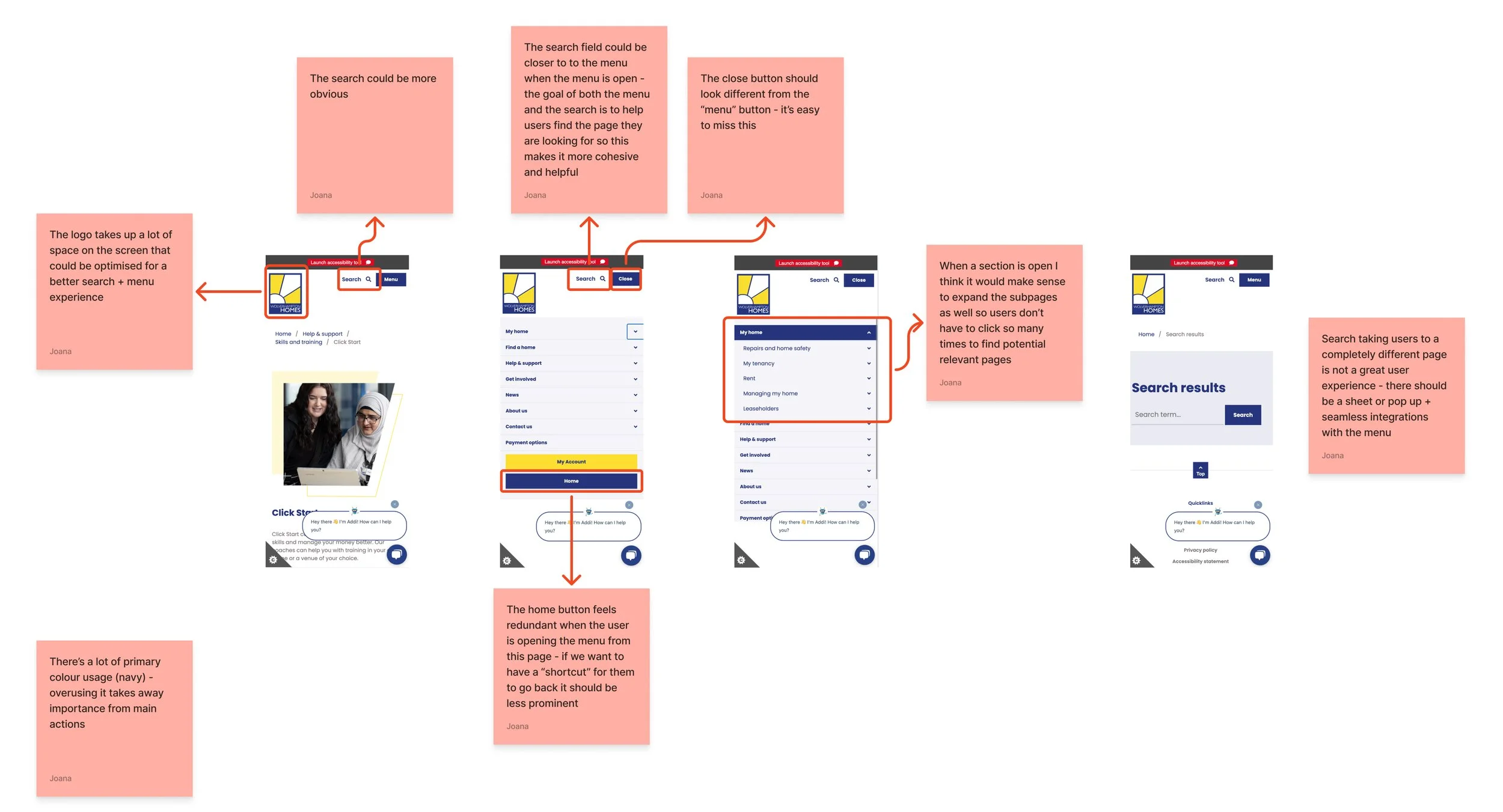
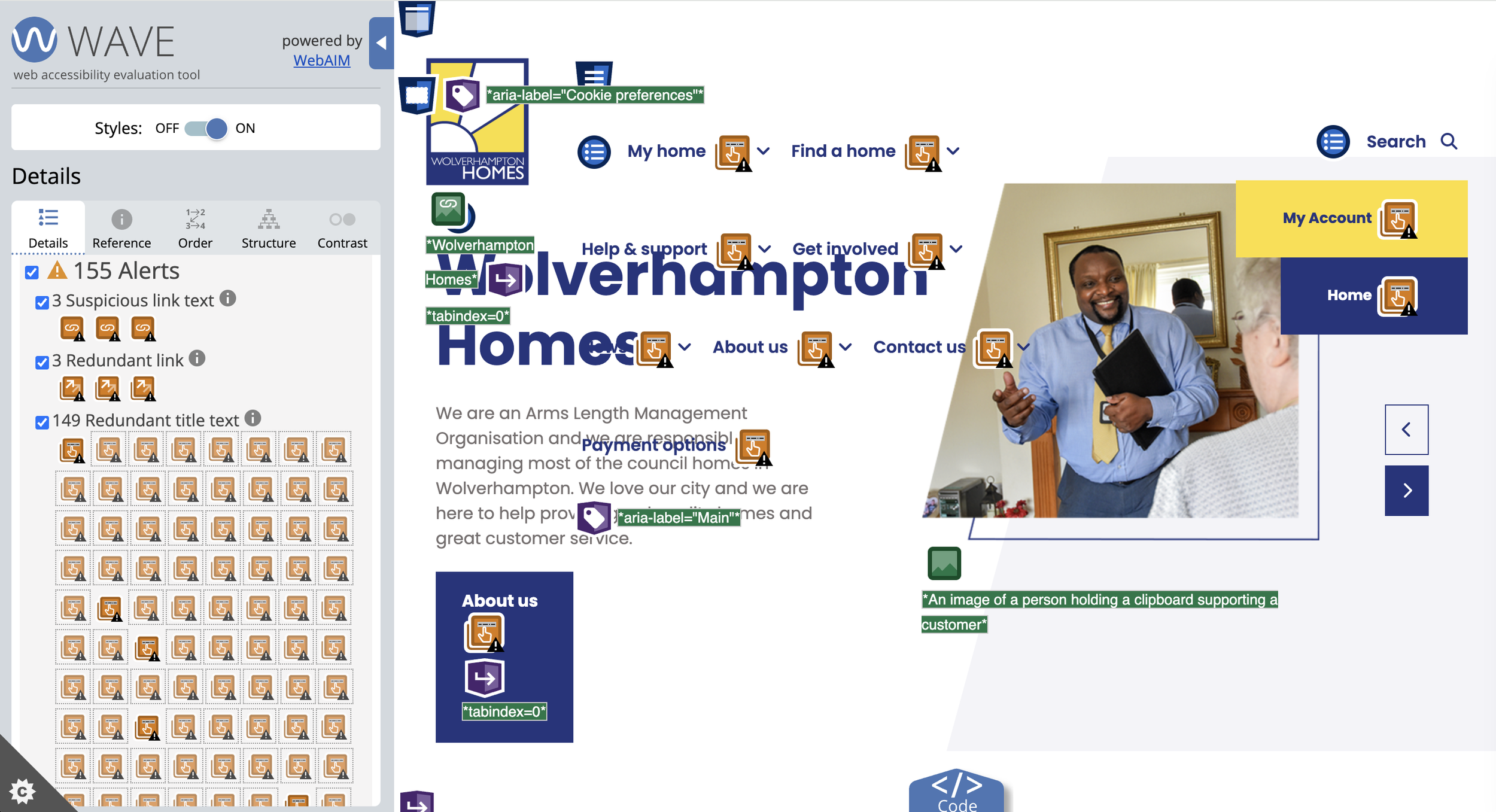
Manual Testing on the menu and search, two of the most problematic areas and Wave testing on the homepage 🚨
Competitor Analysis
I always look at what other housing associations are doing, not necessarily for inspiration but to understand what good looks like in this sector, and where our client is falling behind.
What stood out most was how consistently the better sites nailed three things Wolverhampton Homes was struggling with: mobile-first layouts, clear service categorisation, and shallow navigation.
Those gaps fed directly into my IA decisions.
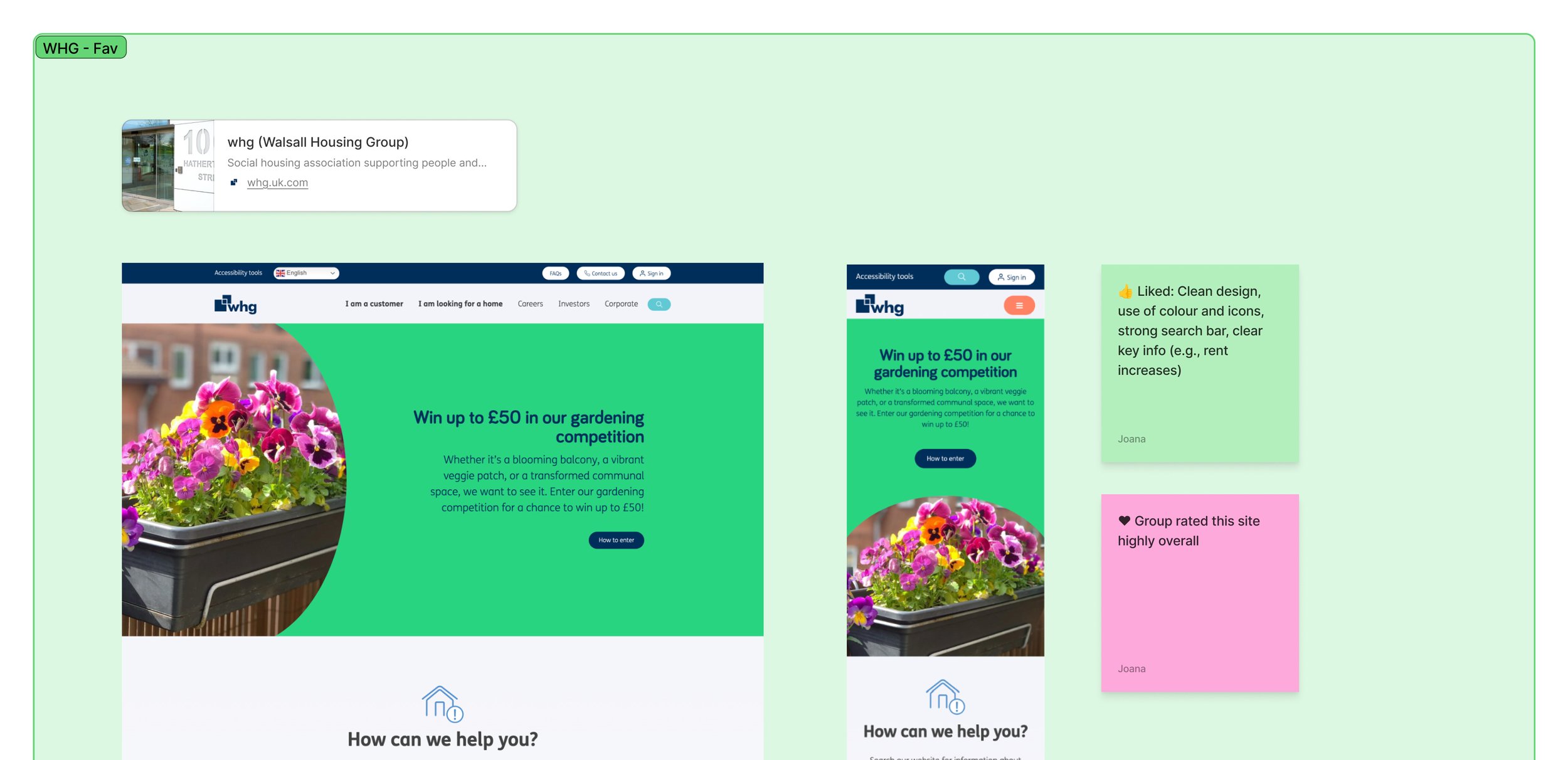
This was one of the competitor websites that most tenants preferred during our sessions
Me 🤝 Claude
With 425 open-ended survey responses and a full accessibility audit to get through, I turned to Claude to help me spot patterns and surface themes I might have missed working through it all manually. This saved me weeks.
I also used Claude to analyse qualitative data from stakeholder interviews and workshop sessions, not just the survey.
I found AI to be particularly helpful at handling huge volumes of data and at pattern recognition during the research phase, so I could focus on interpreting it and contextualise judgement that only a human can do.
I validated every insight Claude surfaced against the source data before it shaped any design decision moving forward.

Claude and I in the trenches
All research methods, data and conversations pointed to the same four critical things: circular navigation that sent users nowhere, a desktop-first design failing an 85% mobile audience, critical accessibility failures locking out the tenants who needed the site most, and a broken repairs journey that over half of tenants wanted fixed.
Sitemap &
Information Architecture
The current website’s content had evolved organically over time which created duplicated content, deeply nested sections and unclear user journeys.
Using all the insights from research, workshops, analytics, and tenant feedback, I redesigned the sitemap and information architecture of the website’s key pages to simplify the navigation and prioritise what tenants really needed.
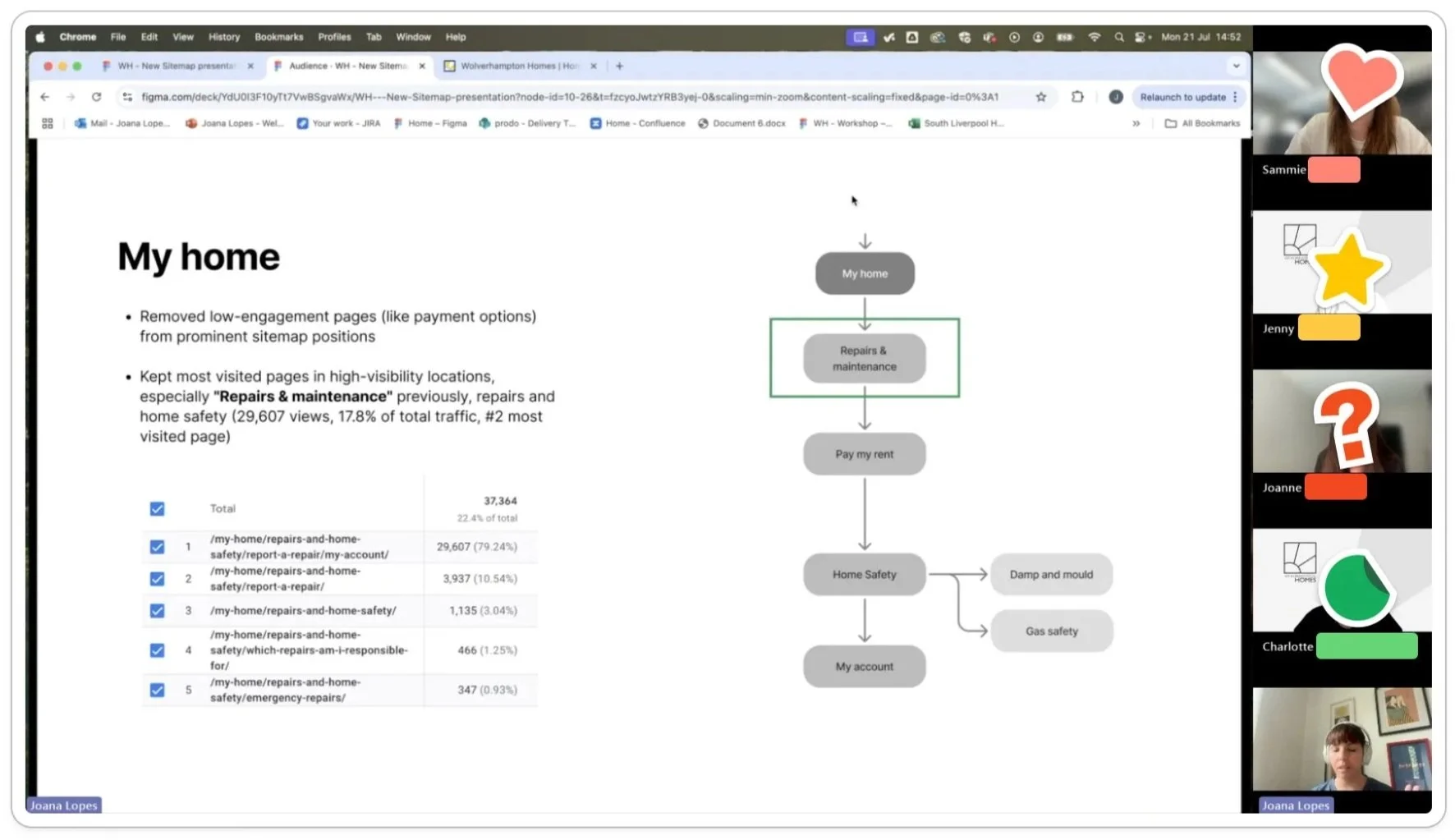
Sitemap
After the discovery phase, I created a new sitemap to map out how content, services, and user journeys should be organised across the website. This helped me simplify a structure that had grown organically over time and gave a clear view of how users navigate key areas of the website.
The new sitemap was designed to make key tasks such as home management, property search, help & support and contact channels more visible and accessible, to ensure users could reach these key actions in fewer steps.
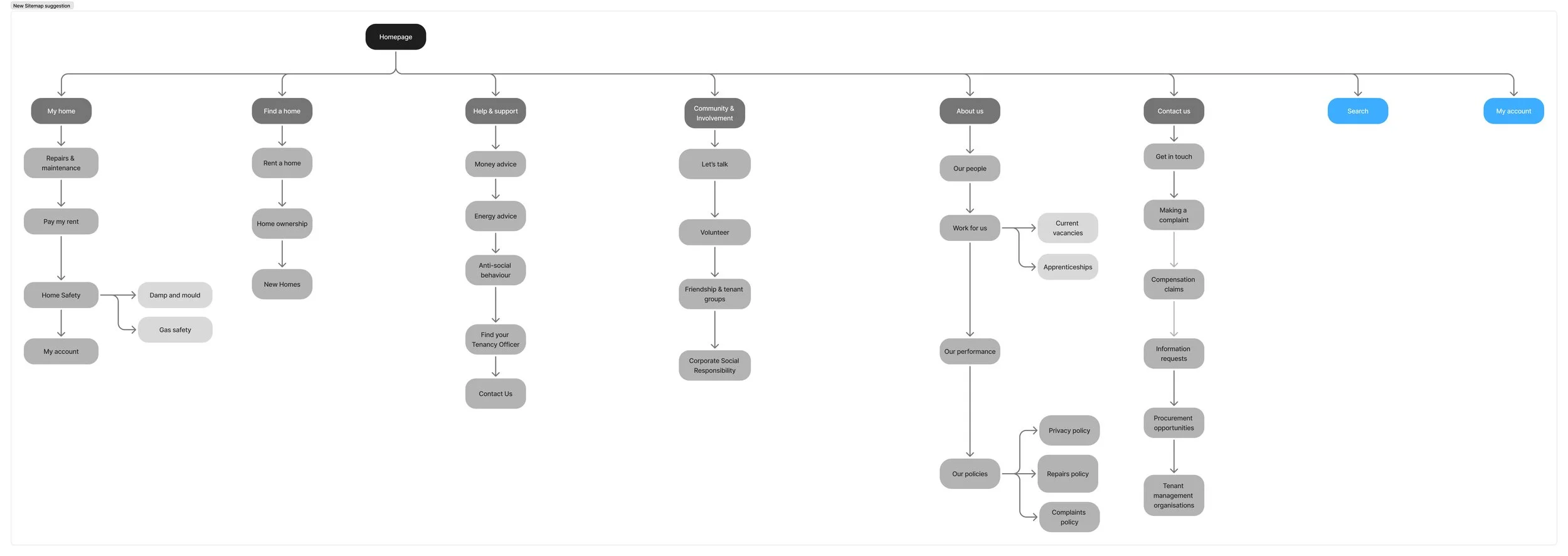
This sitemap focuses on key services and pages rather than showing users every single page available. I’ve also limited third level pages to the absolute minimum and only when they are strictly necessary
Information Architecture
Once the sitemap was approved, I moved on to the top level pages’ information architecture. To define the structure on these pages, I grouped the content based on the research themes I found during research and prioritised high level tasks based on the analytics and user journeys based on what tenants naturally search for an navigate to.
The goal was to improve discoverability and reduce overall cognitive loads for users.
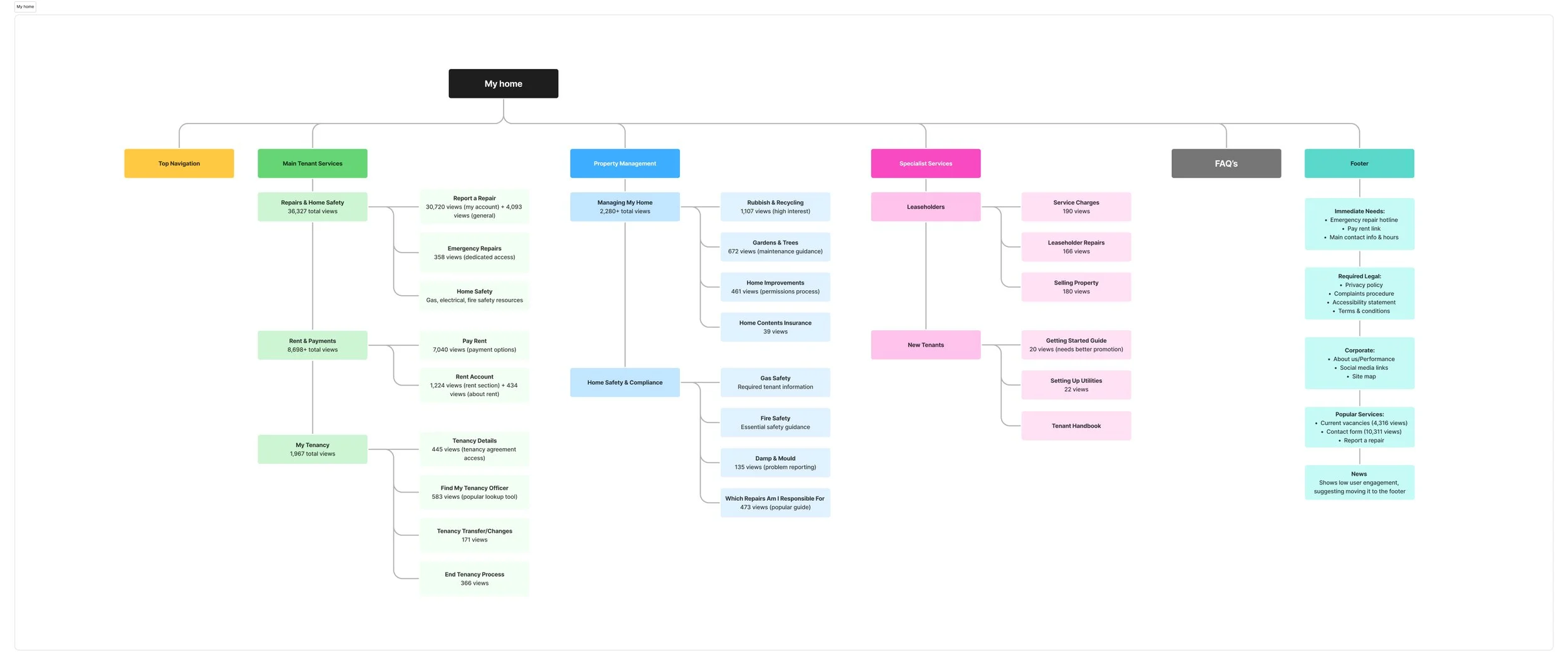
My Home is one of the most important sections on the website: it’s where tenants can go to manage their homes, pay rent or raise repairs
Validation & Next Steps
Once the sitemap and IA were created, I had a review session with the project’s stakeholders. Because these redesigns were based in evidence from the research the approval happened quickly with minimal revisions which allowed me to quickly move to the next step.
This stage created the foundation for everything that followed and really helped reducing uncertainty during design, ensuring that we were solving the right problems.
Wireframes
After the sitemap and IA were approved, I moved into wireframing to establish information hierarchy and test whether layouts would work for tenants. This phase was critical to validate if tenants could quickly find priority actions and that the content hierarchy felt intuitive before investing time in visual exploration.
The research directly informed every wireframe decision. The low homepage engagement (17 seconds) made me prioritise clear service categorisation above the fold, mobile dominance (85.5%!) required mobile-first layouts, and accessibility requirements (proper structure, 44px touch targets, clear hierarchy) had to be priorities from the start.
I started with the homepage and wireframed the first-level pages. I used Figma wireframing libraries to speed up iteration and experimented with Figma's Make (Figma’s AI feature) to explore alternative layouts, evaluating each against tenant research insights which saved me precious time because I didn’t have to wireframe every single option.
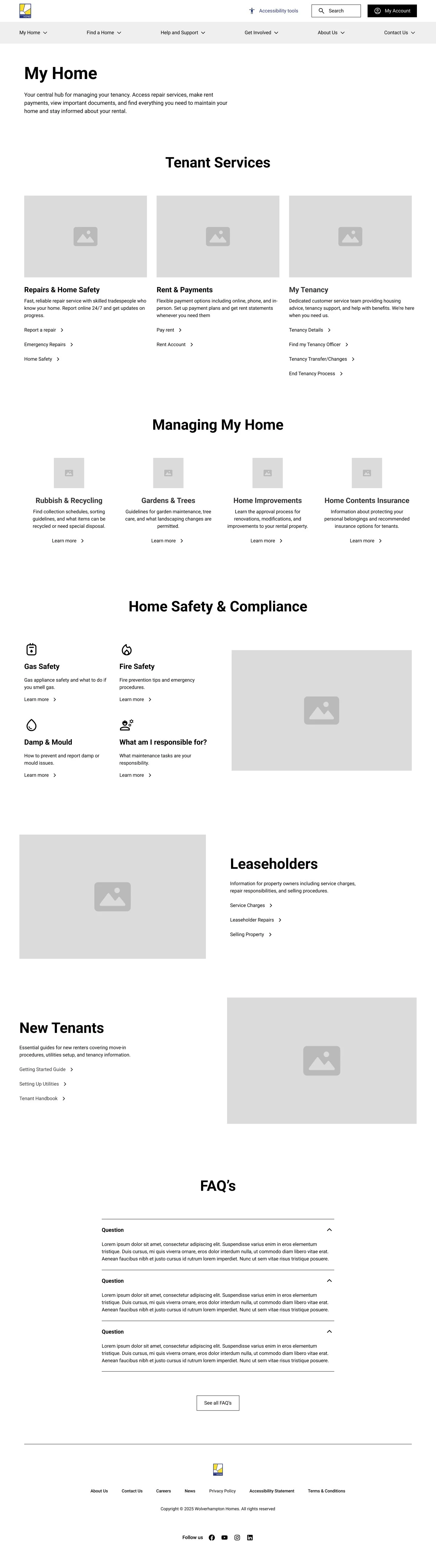

The final homepage wireframe layout on desktop and mobile
Validation
I tested wireframes with tenants from earlier workshops (walking through repair reporting, finding contact information, accessing accounts) and stakeholder review calls. This validation confirmed layouts worked and surfaced small adjustments, like rewording button labels for clarity, before moving into the visual concepts.
Exploring the Visual Direction
WH asked for three visual directions before committing to one. They wanted the same foundations as their brand guidelines and layouts suggested on the sitemap and IA but different emotional tones and different levels of ambition.
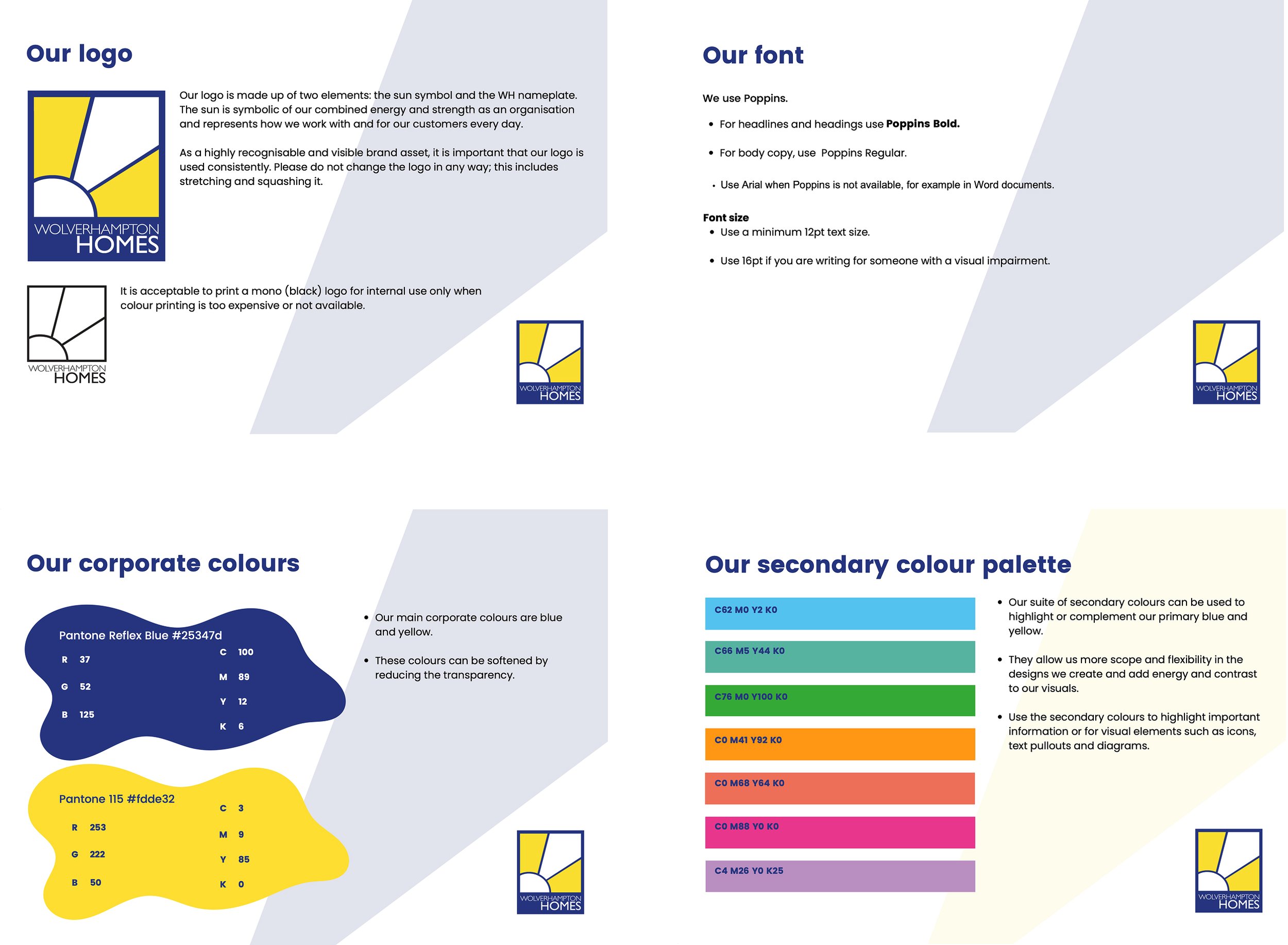
Wolverhampton Logo, Font and colour palette - their brand guidelines were quite basic which was actually great because it allowed me a bit more freedom
Concept A
Conservative Approach
This was the safe option. It had familiar layouts, restrained colour use and was the closest to what tenants already knew.
Concept B
Medium Direction
This concept pushed further with a stronger visual identity, more confident use of the brand's yellow, warmer and more human overall.
Concept C
Bold & Modern
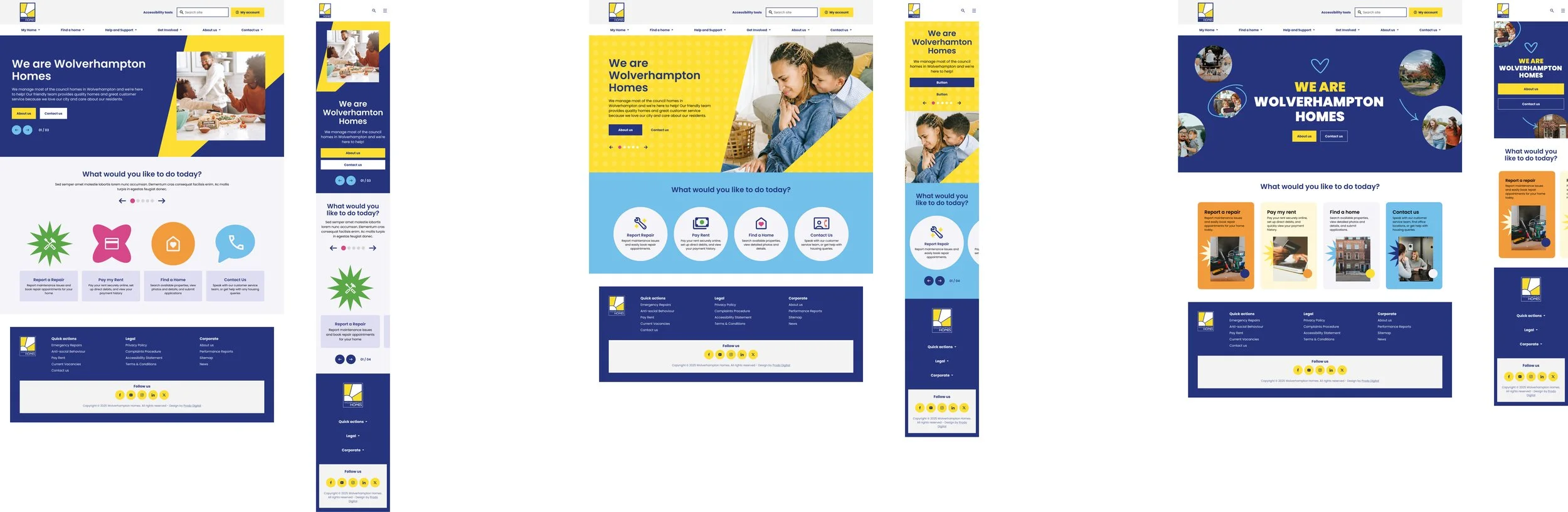
This was the boldest option with expressive use of the brand colours, dynamic hover interactions, and a really exciting use of the sun pattern from their logo.
The conservative, medium and bold options
My recommendation was Concept B as the primary direction, with some of C's bolder elements folded in. I felt like this was the most balanced approach showing: familiarity for less digitally confident tenants, full WCAG compliance, and Wolverhampton Homes' real ambition to feel modern and approachable rather than cold and institutional.
Stakeholder Feedback
The stars aligned and the stakeholder preference and the design rationale matched, which made the conversation easy, but I was prepared to explain how a bolder option could compromise accessibility or create unnecessary cognitive load for the people who needed this site most.
One thing I genuinely didn't expect: stakeholders were so excited about the sun pattern in their existing logo that they started talking about evolving it into a core brand element going forward!
This was all ✨ very exciting! ✨
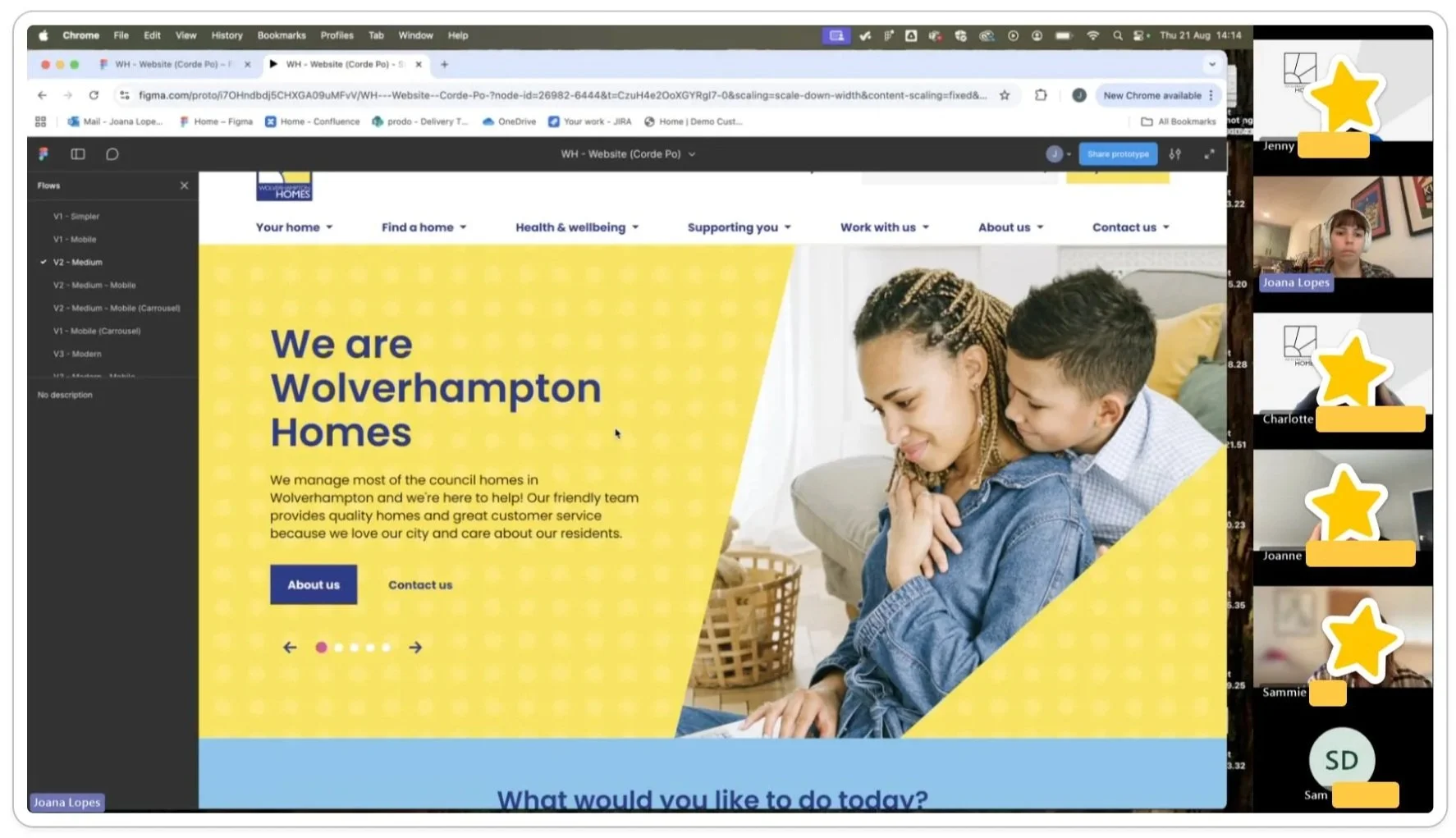
Final UI & Design System: Building a Scalable Foundation
Once the homepage direction was approved, I rolled out the design across the full website.
This phase covered everything: from core templates (landing pages, service pages, repair journeys), navigation systems, search patterns, responsive layouts, and reusable content components. Every element needed to work across devices whilst staying accessible and consistent.
Building the System
I started by creating reusable UI components and patterns with consistent rules. This meant new pages could be built from existing components, engineering had documentation to work from, and future updates could happen at the component level which would create less design debt, make implementation faster and QA easier.
Using AI to Build Faster
I used Figma Make to generate component states ( hover, focus, disabled, etc.) across 40+ components. The point wasn't efficiency for its own sake, what I wanted to do was protecting time for the decisions that actually needed design thinking behind them, like accessibility edge cases and hierarchy calls that couldn't be automated.
Using Figma Make and Claude meant I wasn't introducing inconsistency through repetitive manual work. I also set clear constraints and rules for both tools to keep outputs focused and avoid hallucinations, which is something I'd recommend to anyone using AI in a production design context.
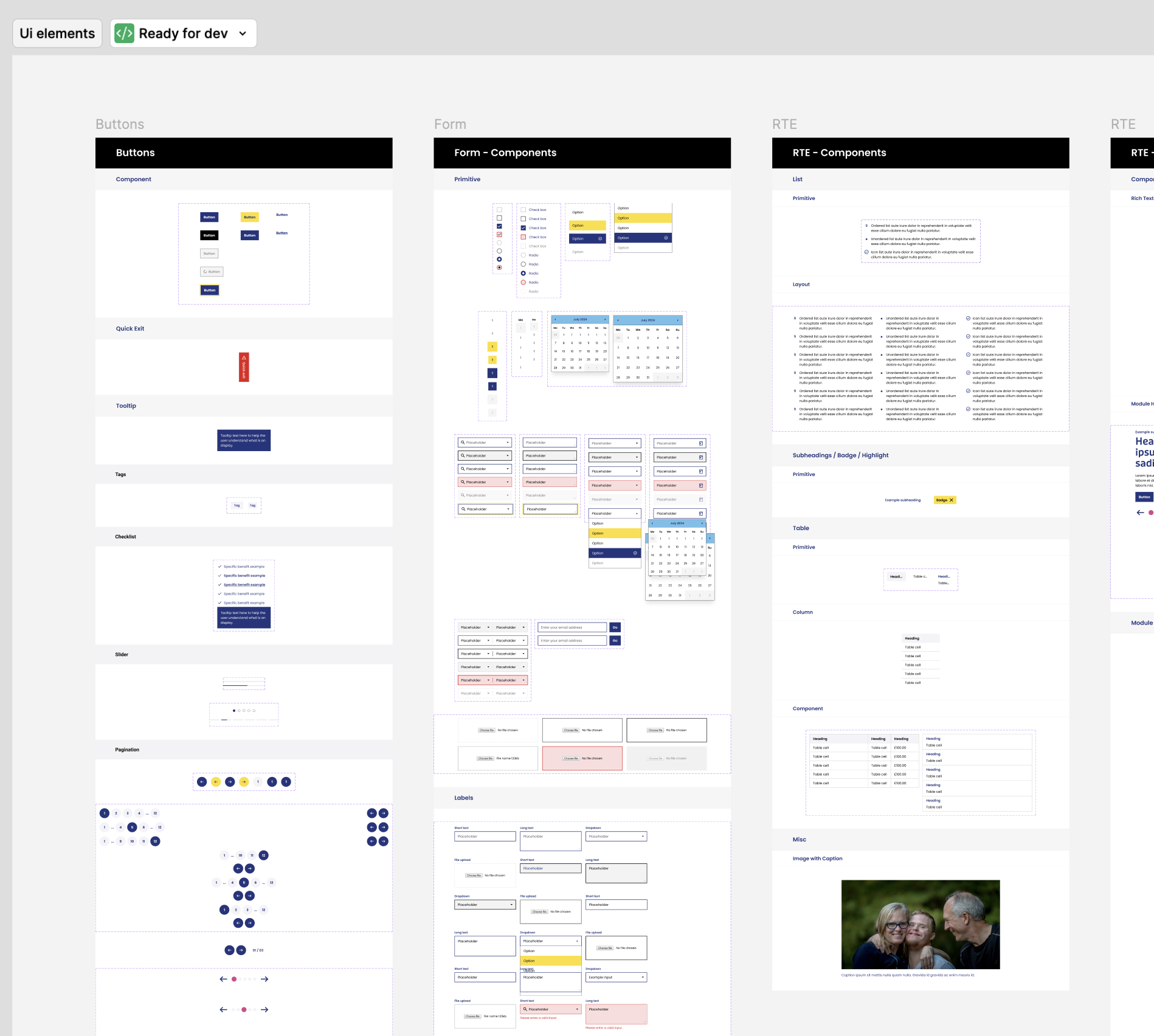
Some of the new website’s base components
Solving Navigation Complexity
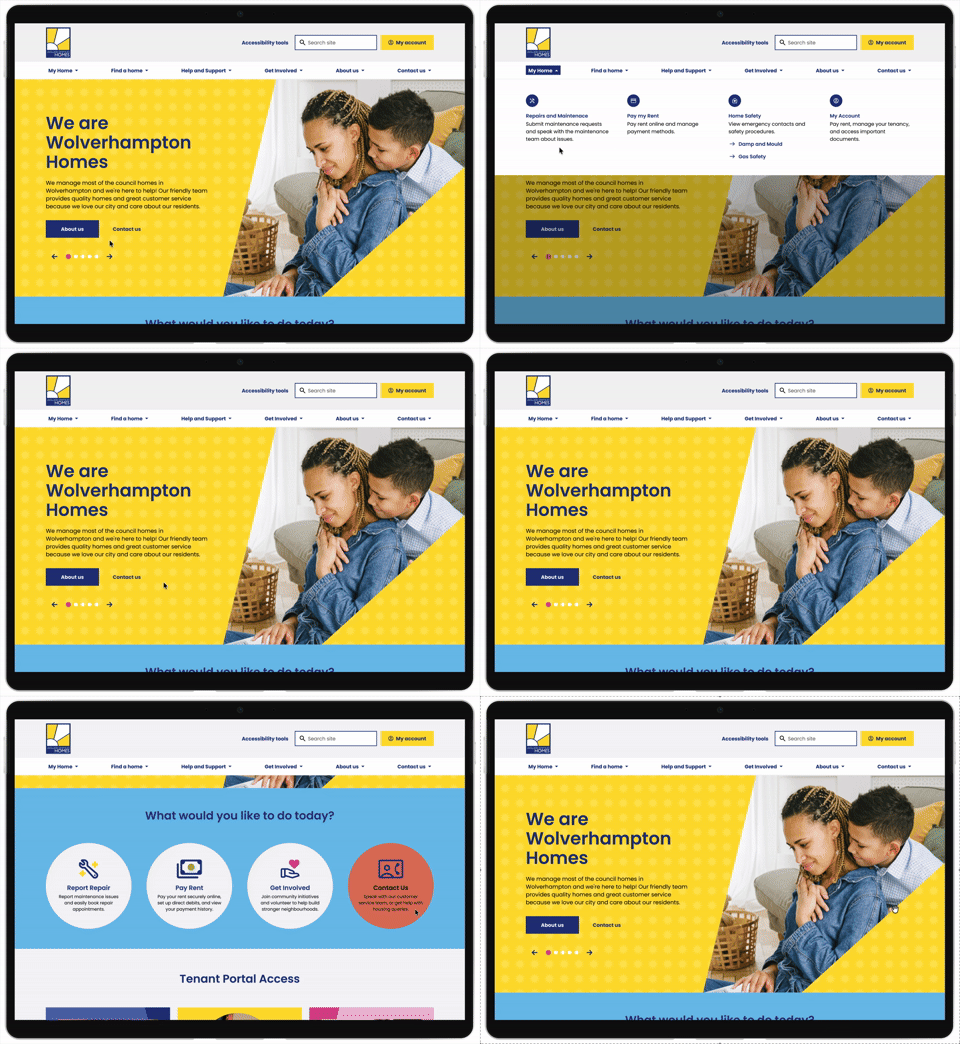
Tenants complained about going "round in circles," 4-5 levels deep navigation, and getting lost when scrolling (non-sticky menus).
To solve the issue I re-categorised and reduce the IA to only the most visited/important pages and made the navigation sticky.
Upgrading the Mobile Experience
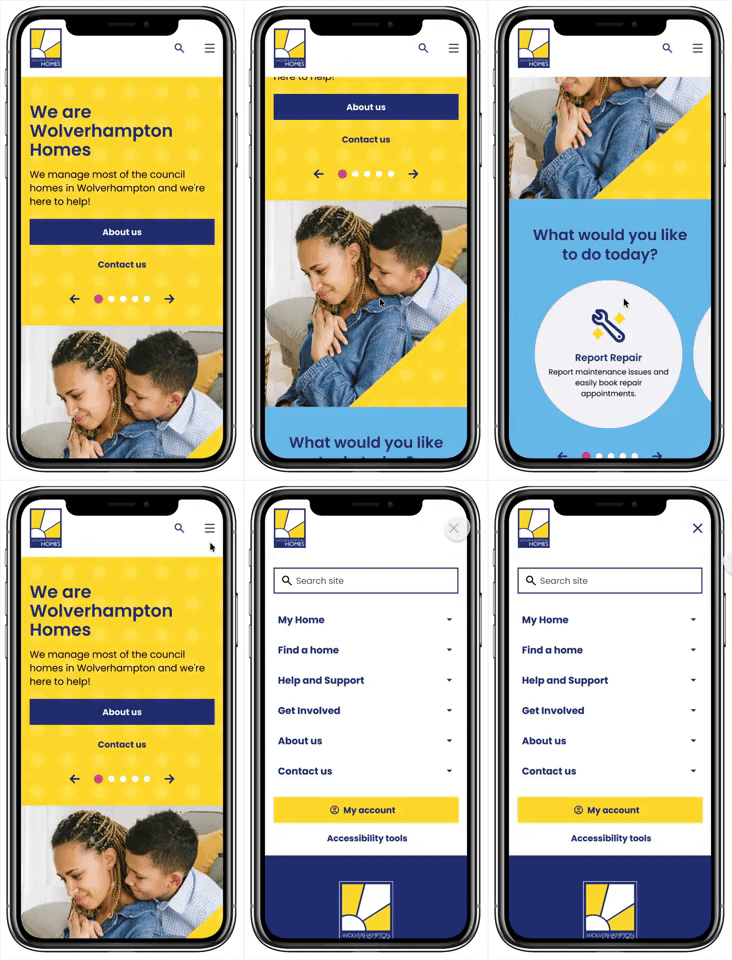
The website was desktop-first but it had 85.5% mobile traffic which translated to poor touch targets, excessive scrolling, and broken layouts.
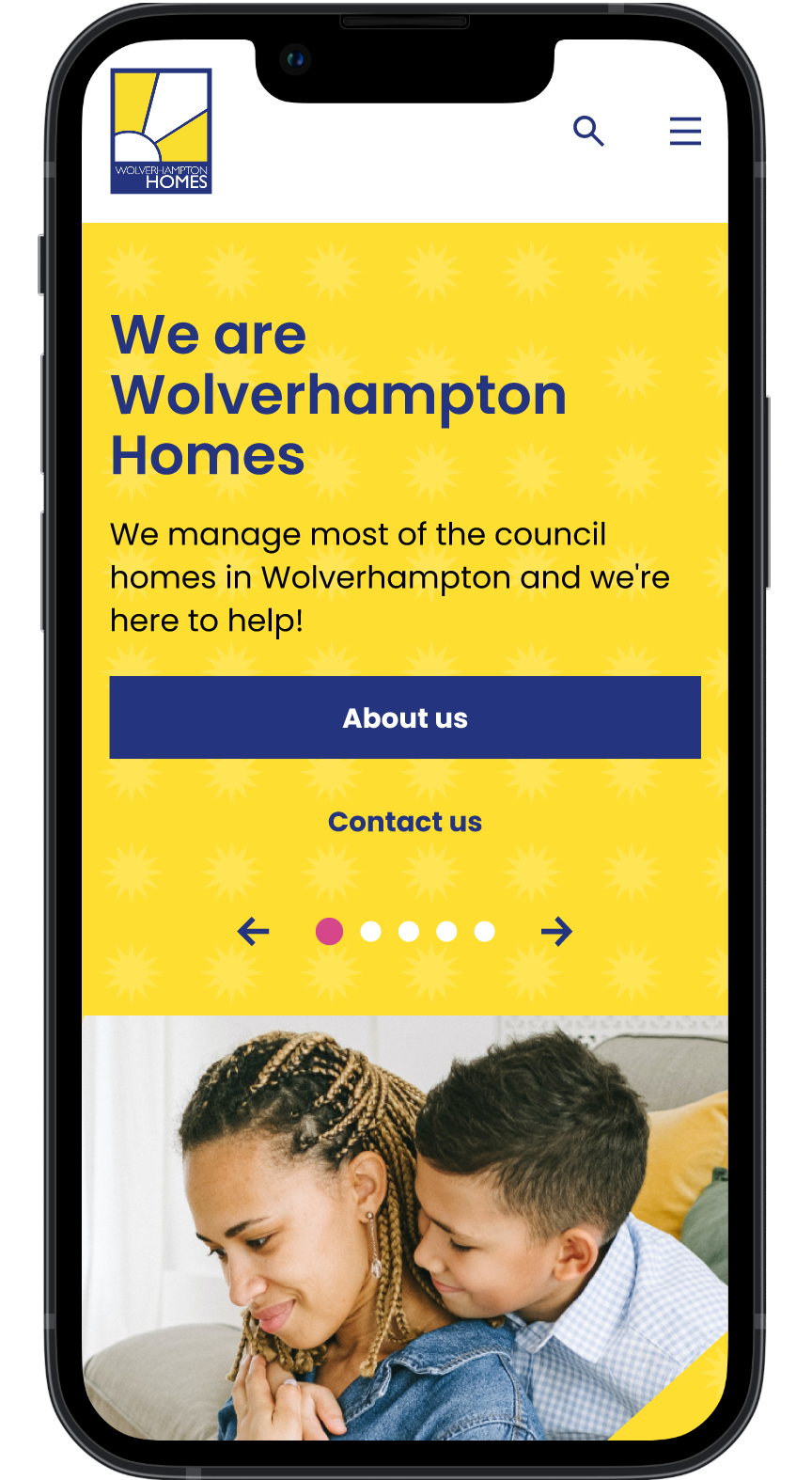
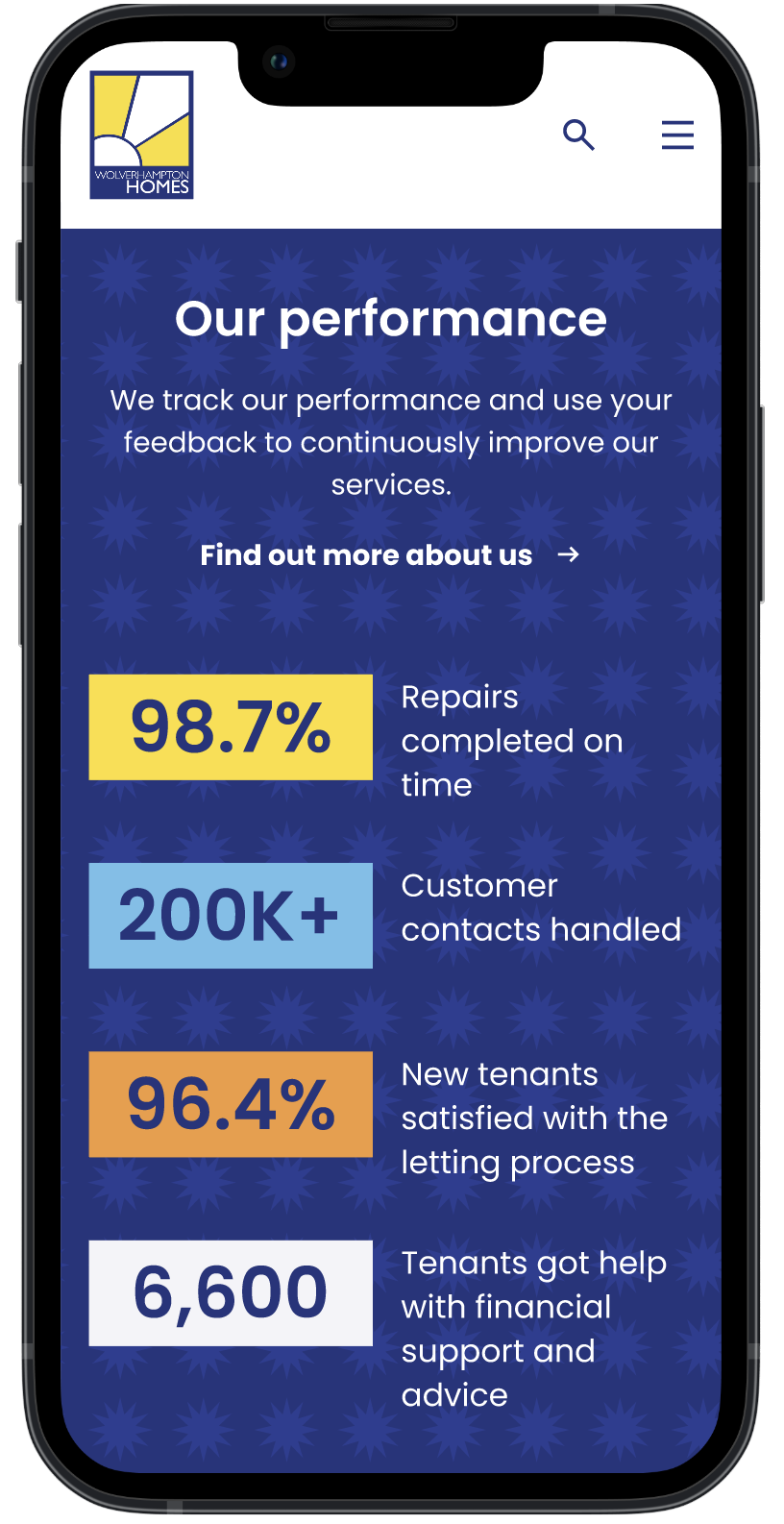
To solve this I took a mobile first approach, keeping accessible touch targets in mind and using thumb friendly layouts with elements like full width buttons.
All layouts are now responsive on all devices and breakpoints making it more inclusive for everyone.
Accessibility First
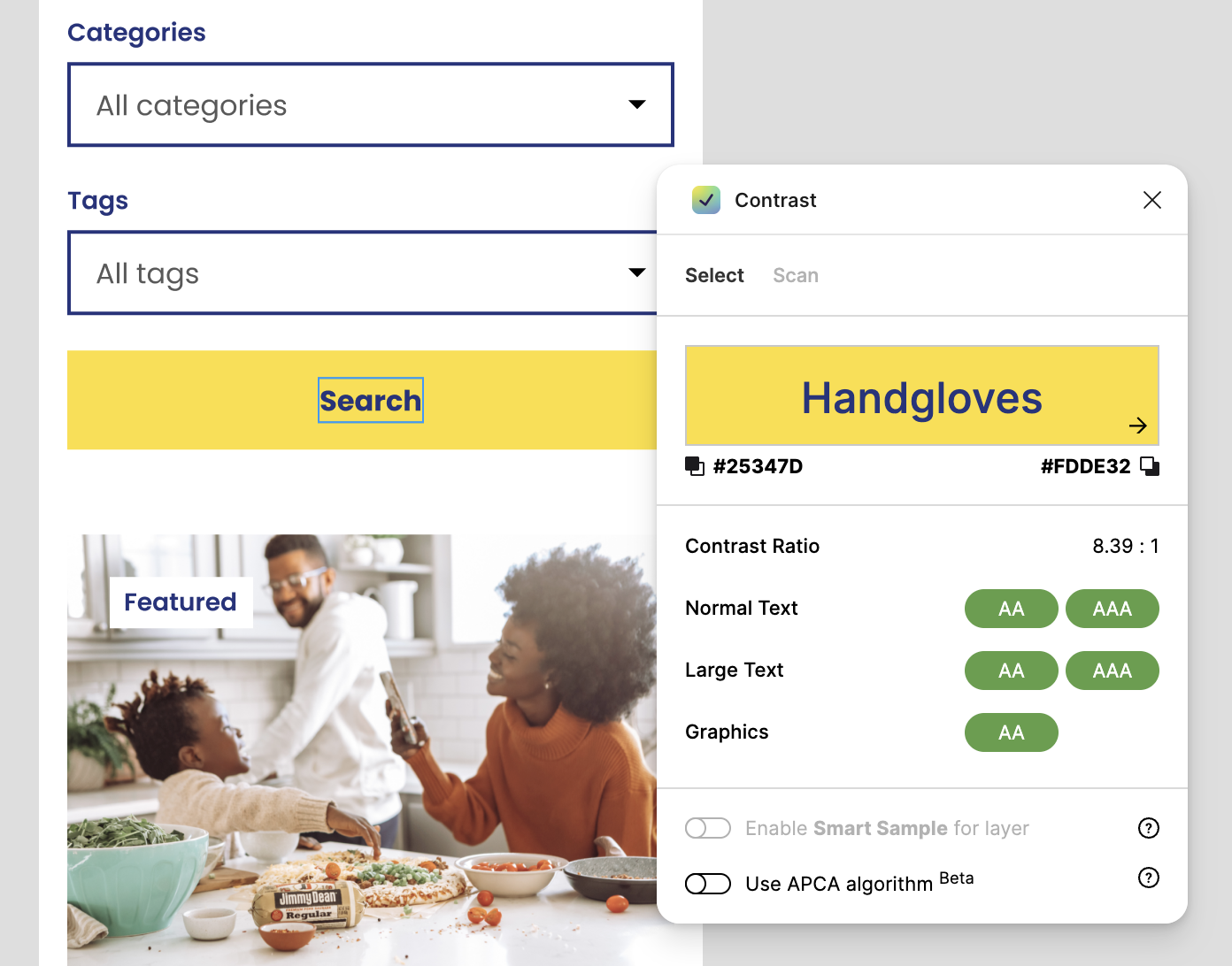
During my audit, I found critical WCAG violations which included things like insufficient colour contrast, missing ARIA labels, content outside landmarks, and poor keyboard navigation. One of my main goals was to solve these barriers and make the platform inclusive.
Beyond the automated audit tools, I used Claude to review content and copy for plain language and cognitive accessibility, and whether instructions would be clear to someone with limited digital literacy or English as a second language.
For a social housing platform serving such a diverse community, that layer of accessibility goes beyond WCAG compliance, it's all about making it usable for tenants.
Making the Homepage work for tenants
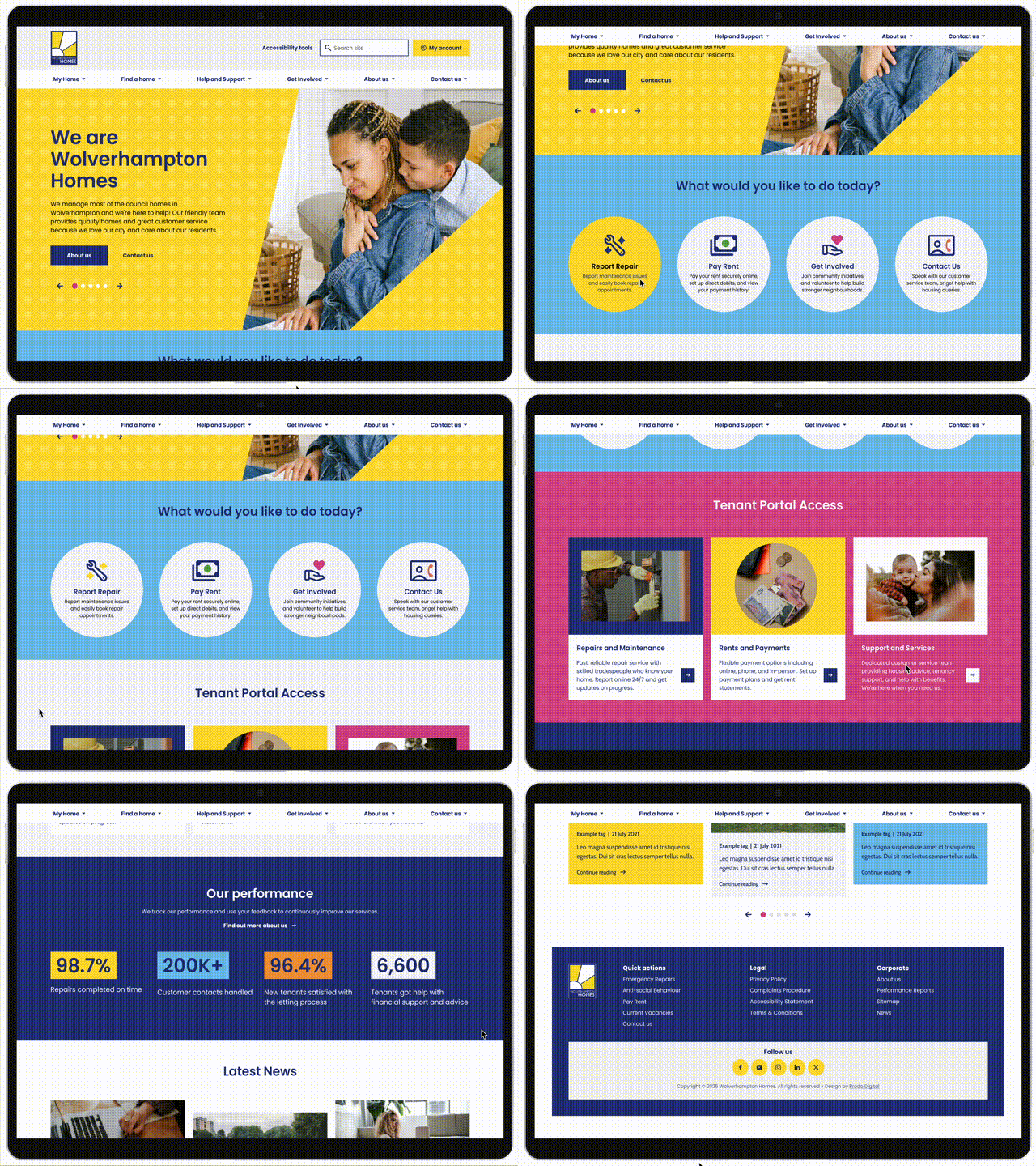
The homepage had the highest visit count on the entire site but the lowest average engagement time — 17 seconds. People were landing and leaving without finding what they needed which indicated a structural issue. The page was organised around how Wolverhampton Homes thought about their services internally, not around what tenants were actually trying to do when they arrived.
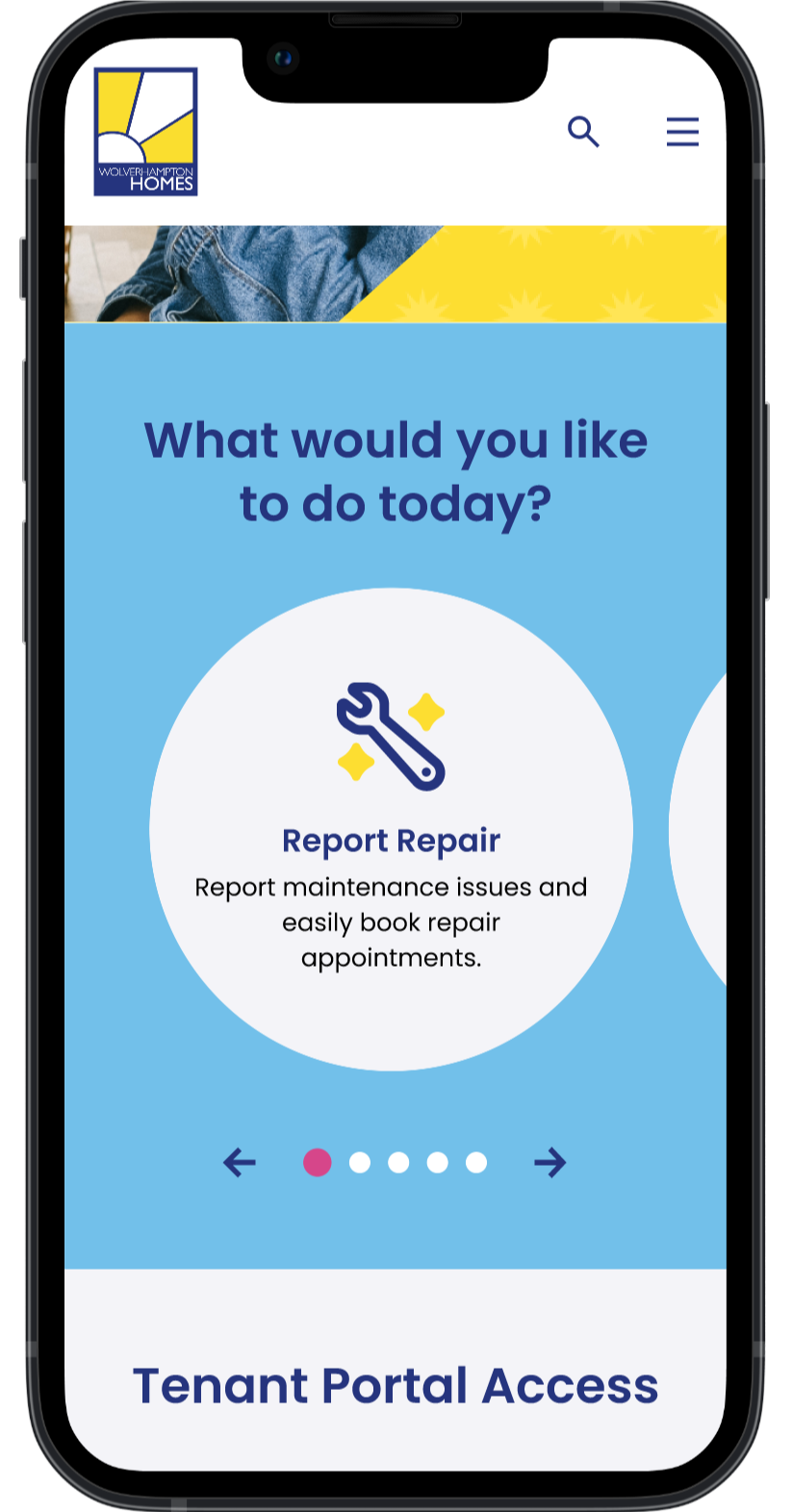
The fix was to reframe the whole thing around one question: what would you like to do today? Simple, but it changes everything. Instead of navigating a council department, tenants are now completing a personal task. The research showed this landed much more naturally with tenants and it’s just more human, really.
Next Steps
Improving the repairs experience
Although the repairs page had thousands of visits, it also showed poor completion, forcing tenants to call instead. The survey showed 53.2% of tenants wanted easier repair reporting.
Repair reporting was a functionality that was part of the SaaS Product which is also a Prodo platform - the report’s page simply give users more information before they are directed to the portal. For this reason, this improvement was part of a separate improvement.
I still re-categorised the menu so it was easier for users to find the page and added repairs as a quick actions to the homepage to help discoverability.
Metrics
The site is currently in development and hasn't launched yet: I'll update this page with performance data as soon as it does.
What I can tell you is what the design has already achieved.
Navigation depth reduced: The new IA brings average navigation depth down from 4–5 levels to 2–3.
Top services surfaced: The three most-visited services — repairs, rent, and contact — are now surfaced as primary actions within one scroll on mobile.
User-centred homepage structure: The homepage is built around what tenants need to do, not how Wolverhampton Homes is structured internally.
100% Accessibility compliance: WCAG 2.1 AA compliance is met across every delivered component, with particular attention to contrast ratios, focus states, touch targets, and semantic structure for screen reader users.
Repairs journey improvement: The repairs journey, the thing 53% of tenants said they most wanted fixed, has been restructured and is now more visible and actually findable from the homepage.
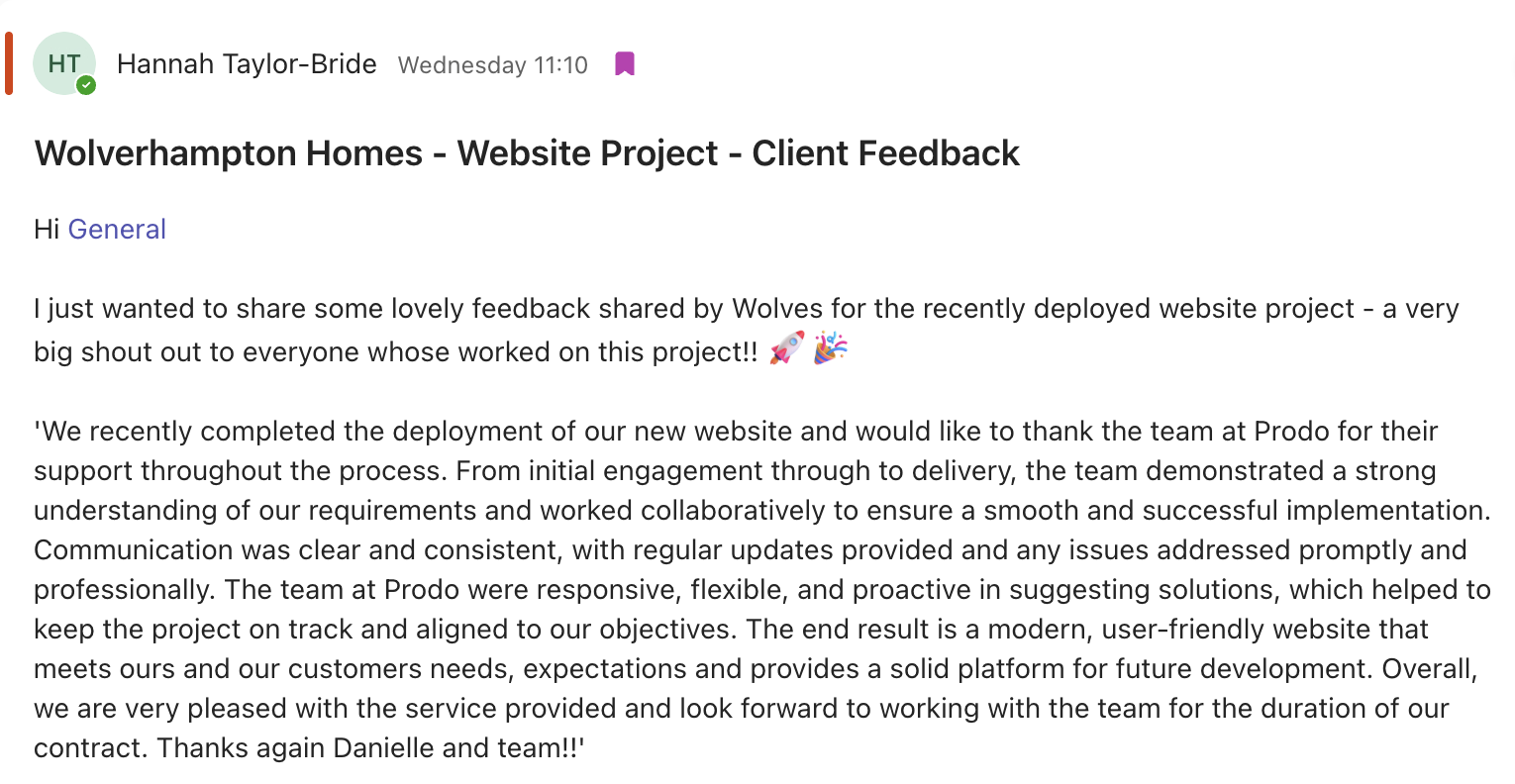
We also received lovely feedback from our client and some of their tenants which is ultimately the goal - make our users happy 💗
What did I make of this project?
This was one of those projects that reminded me of why I got into design in the first place.
Speaking to real tenants who depend on this website made every decision feel consequential. When someone tells you they've had to call the support line just to report a broken boiler because they couldn't figure out the website, that's a person’s time and a real life issue with their home.
Working in social housing means designing for communities that are often invisible in tech and design conversations. Getting accessibility and making something usable for people here isn't a nice-to-have but the whole point of the work, really.
Seeing the stakeholders' excited reaction when the designs came together and how it made them want to evolve their brand really made the work put into this project worth it.

What I'd do differently:
Although the project went really well, if I could change anything I would have pushed for a second round of usability testing with tenants to validate the visual concepts.
I validated the layouts and navigation thoroughly, but testing the final visual direction with the tenants who had the highest accessibility needs would have given me more confidence it was landing right — not just for stakeholders, but for the people it was actually built for.